Basic Root Checker Pro- Unroot
- 4.3
- Rating
- 100.00K
- Installs
- Free
- Price

 Analysis by App-foxy
When I first opened Basic Root Checker Pro- Unroot, I understood its appeal immediately: it is built for the moment when you need a clear answer about root access without digging through technical menus. The app comes from Royal Games Boosters and sits in the Libraries & Demo section, but its practical purpose is much narrower and more useful than that broad category suggests. It focuses on checking whether an Android device has root access and helping users approach unrooting with more confidence.
That makes it a specialist utility rather than an app I would keep open every day. I would install it before troubleshooting a modified phone, after buying a second-hand device, or while preparing a device for an app that expects a more standard security setup. The important question is not whether it feels exciting during the first few minutes. The real question is whether it continues to earn space once the initial check is finished. In my experience, its lasting value depends on whether you regularly manage rooted devices or only need a one-time confirmation.
What the first week feels like
The first week is where this app makes its strongest impression. A root check is normally a simple request, but the result can matter a lot. A phone may have been modified by a previous owner, a repair shop, or the user themselves, and ordinary Android settings do not always give a direct answer. Having a focused tool available is more convenient than guessing from unusual behavior or relying on a random online guide.
You May Also Like

 Blood Strike: 2.5 Anniversary
Blood Strike’s Loadouts Turn Every Drop Into a Tactical Gamble
A close look at Blood Strike’s custom loadouts: how fast access to signature weapons reshapes its battle royale rhythm, rewards preparation, and narrows the gap between fights.

 Pandora - Music & Podcasts
Pandora’s Music Is Easy to Start, but Harder to Recover
Pandora’s strength is its low-effort path from a seed to a station. Its weak spot is how much confidence it asks you to place in connection, setup, and quiet recovery.

 8 Ball Pool
 Is Built on Rivalries, Rematches, and Routine
A close look at the rivalries, rematches, shared routines, and unanswered safety questions that turn a quick pool match into a persistent mobile community.

 Samsung Music
’s Quiet Strength Is Playing What You Already Own
Its reach comes less from spectacle than from dependable access to a personal library. That simplicity is both the app’s strongest retention engine and its ceiling.

 AccuWeather: Weather Radar
AccuWeather Review: A Quick, Clear Forecast for Everyday Decisions
For everyday plans, the best forecast is the one you can understand quickly. AccuWeather makes rain timing, radar, and local conditions easy to act on, with a few trade-offs.

 Hill Climb Racing
Why Hill Climb Racing Still Turns Crashes Into One More Run
A tiny car, a bumpy hill and one more upgrade: Hill Climb Racing keeps resurfacing because its simple chaos makes every near-miss feel personal.
More From Our News Desk



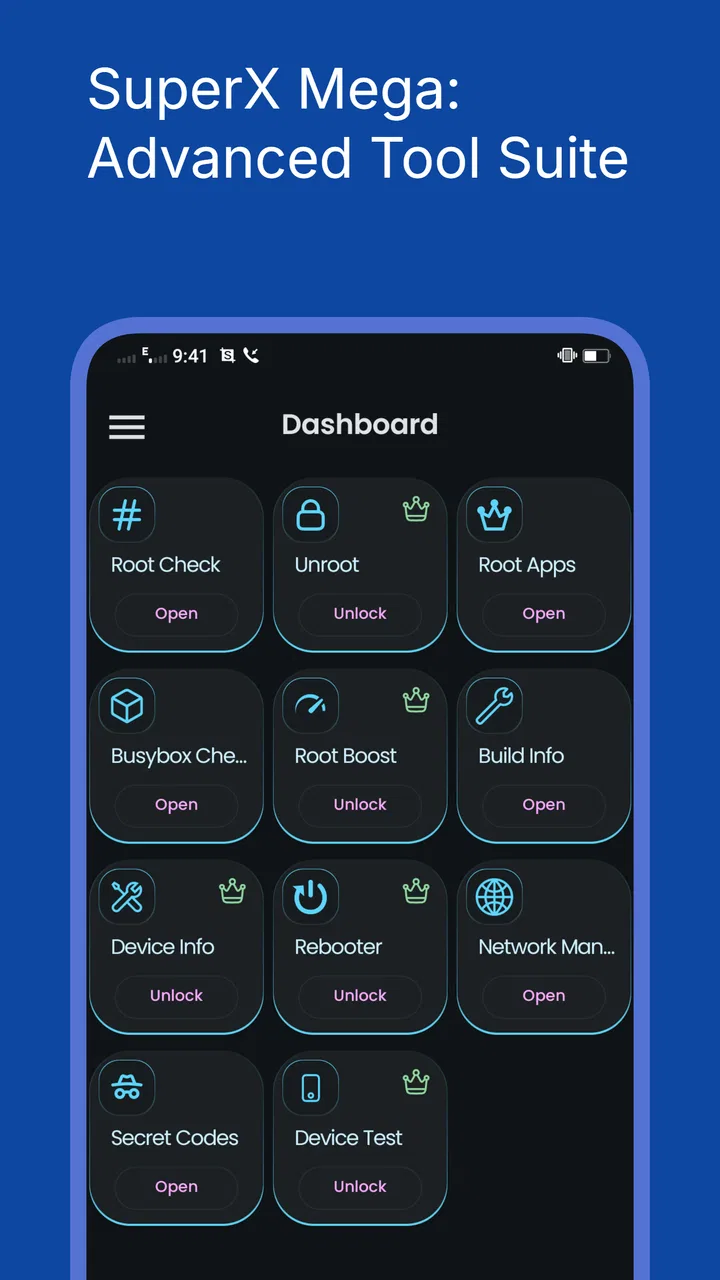
I like the narrow purpose here. The app is not trying to become a file manager, a performance booster, or a general security suite. Its store summary centers on verifying root access, handling unrooting safely, and improving device security. That focus makes the first interaction easier to understand: install it, run the check, read the result, and decide what to do next.
The app is free, which removes the biggest barrier for someone who only needs a diagnosis. It is also marked for Everyone, so the presentation is intended to be approachable rather than aimed only at developers. The minimum operating system is Android 6.0, giving it a useful range for older phones as well as more recent devices. I would still treat the result as a starting point for a decision, not as permission to make risky system changes without a backup.
One practical use case is buying a used Android phone. Before moving personal accounts onto it, I would run a root check and use the result as one part of the inspection process. If the device is rooted, that does not automatically mean it is unsafe or unusable, but it does tell me to ask more questions about its history. If it reports a normal setup, I gain a little more confidence, although I would still install system updates and review the phone’s security settings.
Another useful scenario is troubleshooting an app that refuses to work as expected. Some services behave differently on modified devices, and the user may not know whether root is involved. This tool can shorten the investigation. Instead of immediately resetting the phone or blaming the app, I can first establish whether root status is part of the situation.
The first-week appeal also comes from reducing uncertainty. Root terminology can be intimidating, especially for people who have never used command-line tools or recovery menus. A dedicated checker gives those users a less technical first step. That does not make every follow-up action safe, but it makes the initial question less mysterious.
Where the early experience needs caution
The phrase “unroot safely” deserves careful interpretation. I would not treat a button or instruction inside any root utility as a guarantee that every device will return perfectly to its original state. Root methods differ, system partitions differ, and manufacturers handle software changes differently. Before attempting an unroot operation, I would back up photos, messages, authentication codes, and anything else that would be painful to lose.
I would also avoid using the app as the only security test. Root status is one condition, not a complete health report. A phone can be unrooted and still have outdated software, suspicious applications, a damaged boot configuration, or a compromised account. The app is most useful when it answers its specific question and I combine that answer with ordinary Android maintenance.
That distinction is important for new users. The tool can make root status easier to understand, but it cannot replace careful judgment. During the first week, I would use it to verify, record the result, and plan the next step rather than repeatedly tapping options just to see what happens.
Why it may still matter month after month
For someone who owns one untouched phone, the recurring value is limited. I would probably run the check once, perhaps again after a major repair or system modification, and then leave the app unused. That is not a criticism of its design; it is simply the nature of a diagnostic utility. A good tool can be valuable without becoming a daily habit.
For enthusiasts, repair users, and people who switch between modified and standard Android setups, the picture is different. Root status can change after an update, a restoration, a failed modification, or a deliberate cleanup. Keeping a small checker installed means the next verification is close at hand. The convenience becomes more noticeable when managing several phones or helping family members with devices they do not fully understand.
I can also see value in using it as part of a repeatable maintenance routine. Before handing a phone to another person, I would check its status, review installed applications, update the operating system, and remove personal accounts. Before sending a device for repair, I would verify whether it has been modified and make a backup. The app is not the entire routine, but it can occupy a clear place in it.
A useful habit is to save the result in your own notes alongside the phone model and the reason for the check. That creates a simple history without asking the app to become a full device-management system. If a later problem appears, I can remember whether the phone was already rooted before an update or whether the status changed after maintenance.
The developer, Royal Games Boosters, has kept the product positioned as a focused utility rather than a large collection of unrelated tools. Its current version is 25.08.22, and the app has passed one hundred thousand installs with an average rating of 4.3 from around two thousand ratings. Those figures suggest that it has found a real audience, but they do not change the central trade-off: recurring value comes from the user’s situation, not from constant entertainment or daily productivity.
Compared with ordinary alternatives, the main advantage is directness. Android’s built-in settings can show security information, but they are not designed to answer every root-related question in a single, obvious place. General device-information apps may provide broader hardware and software details, yet that breadth can make a specific root check less immediate. On the other hand, an experienced Android user may prefer established command-line methods or a trusted technical workflow because those approaches can offer more context and control.
That comparison helps define the audience. I would recommend this app to a person who wants a straightforward Android utility and does not want to learn terminal commands just to confirm root status. I would be less enthusiastic for an advanced user who already has a carefully tested toolkit and needs detailed diagnostic output beyond a simple status check.
Small workflows that improve its long-term usefulness
The first workflow I would use is a pre-purchase inspection. After charging a used phone, I would check its root status before signing into banking, work, or password-management accounts. I would then inspect updates, remove unknown applications, and reset the device if appropriate. The root result is not a verdict on the seller, but it is a useful clue that can prevent an uninformed setup.
The second is a post-maintenance check. If I had attempted to restore a standard system or completed a repair, I would run the checker afterward rather than assuming the process worked. This is especially useful when the phone behaves normally but an app still reports an unusual environment. The check gives me a concrete point to compare with the phone’s behavior.
The third is a family-support workflow. If a relative says that a financial or streaming app suddenly refuses to run, I can ask them to install a focused checker instead of walking them through complicated system menus. I would still explain that the result is only one possible cause. This saves time while avoiding the common mistake of immediately deleting data or performing a factory reset.
A fourth tip is to separate checking from changing. I would run the verification first, take note of the outcome, and only then research the correct unroot method for that particular device. This two-step approach is safer than treating a general-purpose unroot option as a universal repair button. It also makes it easier to stop when the phone is already in an acceptable state.
The maintenance burden and the points that cause fatigue
The app itself appears easy to justify when a root question is active, but specialist utilities can become clutter when the original problem disappears. If I no longer use a rooted phone, repair devices, or troubleshoot modified Android installations, I would probably uninstall it after completing my checks. Keeping every occasional tool forever is not automatically good maintenance.
There is also a mental burden around system-level actions. Even if the app presents unrooting as accessible, the consequences of a mistake may be more serious than with a normal settings app. A user who is uncomfortable with backups, recovery procedures, or device-specific instructions should not rush. In that situation, a professional repair technician or the manufacturer’s official restoration process may be a better choice.
Another source of fatigue is ambiguity. Root detection is not always a simple yes-or-no topic in the real world. A device can have traces of modification, a changed boot state, or restrictions that affect how applications interpret its security condition. If the result does not match what another app reports, I would not keep repeating the same check and hope for certainty. I would compare the device’s software version, recent changes, and the requirements of the app that is failing.
This is where broader alternatives can be better. A full device-information tool may be more useful when I need processor details, Android build information, storage health, or battery data at the same time. Official manufacturer software is preferable when the goal is warranty service or a factory restoration. A technical root-management solution may be better for an experienced user who needs granular control rather than a simple confirmation.
Privacy and security habits matter too. Because this is a security-related utility, I would download it from a trustworthy source, keep Android updated, and avoid granting access that does not make sense for the task. I would not assume that an app with a security theme can automatically secure the entire phone. The most valuable protection still comes from updates, strong account security, careful installation choices, and backups.
Who should keep it installed
I think it earns a permanent place on the phone of an Android hobbyist who frequently tests software, maintains older devices, or helps others diagnose modified systems. It is also sensible for a repair kit, where a quick root-status check can be useful before and after work. In those cases, the app’s narrow focus becomes an advantage because it avoids turning a quick inspection into a long technical session.
It is less suitable for someone who expects a complete security audit. The store summary points toward root verification, unrooting, and stronger device security, but I would still use it as one instrument in a larger process. It should not be the only reason to trust a phone with sensitive accounts, and it should not encourage a beginner to alter system software casually.
I would also skip it if I only want general Android information. Installing a root-focused tool for battery statistics, storage cleanup, or performance monitoring would be unnecessary. A broader utility would serve those needs better and reduce the number of separate apps on the device.
My long-term verdict
After the novelty fades, Basic Root Checker Pro- Unroot remains useful for a clearly defined group rather than for everyone. Its strongest quality is that it turns a potentially confusing root-status question into a more approachable first check. The free price, Everyone content rating, and support for Android 6.0 or later make it easy to try, while its focused design keeps the purpose understandable.
My recommendation is conditional but positive. If you are buying a second-hand Android phone, restoring a modified device, troubleshooting an app that may object to root, or maintaining several phones, I would keep this tool available. Use it before making changes, record what it reports, and treat unrooting as a device-specific operation that deserves a backup and proper research.
If your phone has never been modified and you have no reason to investigate root access, its long-term place is much weaker. You may get immediate reassurance from one check, but there may be little reason to open it again. In that case, uninstalling it after the job is done is a sensible form of maintenance rather than a sign that the app failed.
The app does not need to become a daily habit to be worthwhile. Its recurring value is more like a small tool in a drawer: easy to overlook, but welcome when a specific problem appears. For me, that is the honest measure of its success. It earns lasting space when root status is part of your routine; otherwise, it is best treated as a dependable temporary specialist.
FAQs for Basic Root Checker Pro- Unroot
01What is Basic Root Checker Pro - Unroot and what does it do?
Basic Root Checker Pro - Unroot is an app designed to help Android users verify if their device has root access or not. It provides a simple interface to check the root status and offers guidance on how to unroot your device for enhanced security and stability.
02Is Basic Root Checker Pro - Unroot safe to use on my device?
Yes, Basic Root Checker Pro - Unroot is safe to use. It doesn’t modify any system files or compromise your device. The app simply checks the root status without requiring any special permissions, ensuring your data remains secure and private.
03Can Basic Root Checker Pro - Unroot help me unroot my device?
While Basic Root Checker Pro - Unroot primarily checks root status, it also provides resources and guides on how to unroot your device. However, the actual unrooting process may require additional tools or steps outside the app's functionality.
04Will using this app affect my device’s warranty?
Using Basic Root Checker Pro - Unroot itself does not affect your device’s warranty. However, if your device is rooted, it may void the warranty depending on the manufacturer's policy. Unrooting the device can help restore warranty in some cases.
05Does Basic Root Checker Pro - Unroot support all Android devices?
Basic Root Checker Pro - Unroot is compatible with most Android devices. However, certain manufacturers or custom ROMs may have unique configurations that could affect the app’s performance. It is recommended to check compatibility with your specific device model in the app description or user reviews.
Pros
- Simple and user-friendly interface.
- Quickly checks root status of the device.
- No ads to interrupt usage.
- Provides detailed root information.
- Small app size saves storage space.
Cons
- Limited to root status verification.
- No advanced root management features.
- Requires internet for some functions.
- Occasional false positives on root status.
- Limited support for newer device models.

Basic Root Checker Pro- Unroot
Gallery